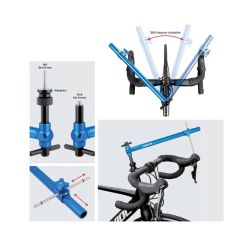
This tool provides a simple and precise way to check and adjust the horizontal height of brake levers.
Screws onto the headset: M6 and M10 screws
Instructions:
1. Remove the headset cap and screws.
2. Screw the adapter onto the star nut.
3. Screw the tube onto the adapter.
4. Rotate the circular adjustment rod to the top of the shift lever position, loosen the knob, move the sliding bracket and the measuring rod so that the top of the measuring rod touches the top of the shift lever position, secure the O-ring, and tighten the knob.
5. Rotate the circular adjustment rod to the other side of the shift lever position. If the top of the measuring rod is higher or lower than the shift lever position, adjust the height of the shift lever until the top of the measuring rod just touches the shift lever position.
Included:
1 x Handle
2 x JDD Mounts
1 x M10 Screw
1 x Alignment Arm
2 x JDD Adapters
1 x M6 Screw
1 x Sliding Bracket
1 x Knob and Threaded Rod
1 x Gasket
1 x Gauge